
Overview
This guide explains how to connect your business systems to Flowpoint and send invoices to NRS through our API.
Before you can use the API, your organisation needs a Flowpoint portal account. Create an account, sign in, complete your business profile, then create an API key under Settings → API Access.
Talk to us to get a Flowpoint account
Already have an account? Sign in to the portal. Sign in
What is Flowpoint?
Flowpoint is an e-invoicing platform built for Nigerian businesses. You create invoices in your own systems — QuickBooks, Zoho, a custom ERP, "Flowpoint" itself, or any software that can send HTTP requests — and Flowpoint submits them to the Nigeria Revenue Service (NRS) on your behalf.
When NRS accepts an invoice, you receive an Invoice Reference Number (IRN) and a QR code you can print, email, or share with buyers. Every submission is recorded so your finance team can trace what was sent, when, and what NRS returned.
Why e-invoicing in Nigeria
Nigeria’s e-invoicing rules require many businesses to issue invoices through the NRS e-invoicing system. Paper invoices and informal spreadsheets no longer meet compliance expectations for B2B, B2G, and much of B2C trade.
- Stay aligned with NRS requirements and reduce the risk of rejected or disputed invoices.
- Give buyers confidence — they can verify an IRN without calling your accounts team.
- Cut manual re-keying between your accounting software and a separate compliance tool.
- Keep a clear record of every invoice sent, every IRN received, and every failure — ready for your accountant or auditor.
Who this API is for
The Flowpoint API is for businesses and the people who connect their software to it:
- Finance teams automating invoice creation from an ERP or accounting package.
- Software integrators building a connection for a client’s QuickBooks, Xero, or in-house system.
- Operations leads who need invoices to leave their system and reach NRS without daily manual uploads.
How integration works
Most integrations follow the same path. You prepare invoice data in your system; Flowpoint validates it, submits to NRS, and returns the outcome.
- Create a business account on the Flowpoint portal, then complete your business profile — company name, TIN, address, and primary location.
- Create an API key under Settings → API Access (a portal administrator does this once).
- Send invoice details to Flowpoint as JSON — one invoice per request, or use bulk options where documented.
- Flowpoint submits to NRS. Poll invoice status with the API, or register a webhook URL to receive updates automatically.
- Store the IRN and QR code in your system. Optionally share the public verify link so buyers can confirm an invoice is genuine.
Your ERP or accounting system
QuickBooks, Zoho, custom software
Flowpoint API
Validates and submits your invoice
Nigeria Revenue Service
Signs and records the invoice
IRN and QR code
Returned to your system
Your ERP or accounting system
QuickBooks, Zoho, custom software
Flowpoint API
Validates and submits your invoice
Nigeria Revenue Service
Signs and records the invoice
IRN and QR code
Returned to your system
Invoice types at a glance
Choose the right invoice kind when you create an invoice. B2B and B2G require more buyer detail because NRS needs it for business and government transactions.
| Invoice type | Typical use | Buyer details you send |
|---|---|---|
| B2B (business to business) | Invoices to another registered company | Full buyer name, TIN, email, street address, city, and postal code |
| B2G (business to government) | Invoices to a government buyer | Same as B2B — full buyer details required |
| B2C (business to consumer) | Retail or walk-in sales | Buyer name only — no TIN or address required on the invoice |
Guidelines for integrators
- Use human-readable invoice numbers (e.g. INV-2026-001), not internal UUIDs — they appear on the IRN.
- For B2B and B2G, send complete buyer contact and address fields before calling create; missing fields are the most common cause of rejection.
- Keep API keys secret. Treat them like passwords — never commit them to source control or expose them in browser code.
- If you hit rate limits, wait and retry with backoff rather than hammering the API.
- Use the Helpers endpoints for valid state, LGA, tax category, and product codes instead of hard-coding lists that may change.
- Register webhooks over HTTPS if you want real-time updates instead of polling status.
Quick start
API version 1.0.0
Base URL
https://api.tryflowpoint.com
Common headers
X-Flowpoint-Key: <api_key>— required on every authenticated requestContent-Type: application/json— required on POST/PATCH JSON bodies
If you are having trouble with the API or need help getting started, contact support.
Authentication
Before you can use the API, your organisation needs a Flowpoint portal account. Create an account, sign in, complete your business profile, then create an API key under Settings → API Access.
Talk to us to get a Flowpoint account
Already have an account? Sign in to the portal. Sign in
Once your portal account is set up, authenticated API requests require an API key. Send your key in the X-Flowpoint-Key header on every request.
API keys
- After registering on the portal, create keys under Settings → API Access (portal administrator required).
- Send the plaintext key in the
X-Flowpoint-Keyheader. - Revoked or expired keys return 401. Keys cannot access admin-only settings routes.
- Each key has explicit scopes selected at creation. The key must include the scope required by the endpoint.
- Requests with a valid key but without the required scope return HTTP 403 with
API_KEY_SCOPE_REQUIRED. - Scopes cannot be changed after creation; create a replacement key with the new scopes, then revoke the old key.
Available scopes
Scopes include invoice.view, invoice.create, invoice.submit, masterdata.view, masterdata.manage, and the review, settings, and team permissions. Portal roles do not grant API-key scopes.
The invoice creation endpoint submits automatically, so an API key used with POST /api/v1/invoices/create must include both invoice.create and invoice.submit.

Admin-only (not API key)
Tenant profile, crypto keys, locations, integration connectors, and webhook subscription management require a portal admin session. API keys receive 403 on those routes.
Rate Limits
Limits use a 1-minute window and expose RateLimit-* draft-7 headers. Exceeding limits returns HTTP 429 — implement exponential backoff.
Global limits (per IP)
| Scope | Default limit |
|---|---|
| Authentication (/api/v1/auth/*) | 10 requests/minute |
| All other /api/v1/* | 120 requests/minute |
Invoice write limits (per tenant)
Keyed on tenant ID (not IP). Protects against a single compromised key flooding writes.
| Route | Limit |
|---|---|
| POST /api/v1/invoices/create | 60 requests/minute |
List pagination
Collection GETs return { "items": [], "total": 142, "limit": 50, "offset": 0 }. Query params: limit (default 50), offset (default 0), plus resource filters documented on each list endpoint.
| Endpoint | Max limit |
|---|---|
| GET /api/v1/invoices | 500 |
| GET /api/v1/customers | 200 |
| GET /api/v1/items | 200 |
GET /api/v1/invoices returns certified invoices only.
Create invoice fields
POST /api/v1/invoices/create accepts a Flowpoint invoice request shape — not raw NRS JSON. The customer object in the request is the buyer. Your supplier (seller) is always your organisation as the Flowpoint tenant — derived from your business profile and primary location, not from the JSON body. B2B (Business-to-Business) and B2G (Business-to-Government) share the same buyer requirements; B2C (Business-to-Consumer) is lighter.
Download sample B2B invoice·Download sample B2C invoice·Download sample B2G invoice
Common fields (all invoice kinds)
| Field | B2B / B2G | B2C | Notes |
|---|---|---|---|
| invoice_kind | Required | Required | B2B, B2C, or B2G |
| invoice_type | Required | Required | invoice, credit_note, or debit_note |
| document_number | Required | Required | Human-readable invoice number (not a UUID). Used to generate the IRN. |
| issue_date | Required | Required | Invoice issue date, ISO format YYYY-MM-DD |
| due_date | Optional | Optional | ISO date YYYY-MM-DD; if omitted, Flowpoint uses issue_date before NRS submission |
| document_currency | Required | Required | Currency for invoice amounts; defaults to NGN, or to tax_currency when that is the only one supplied |
| tax_currency | Required | Required | Currency for tax amounts; defaults to NGN, or to document_currency when that is the only one supplied |
| customer.name | Required | Required | Buyer display name |
| lines[] | Required (≥1) | Required (≥1) | See the invoice line fields below. Every line must include exactly one classification code. |
| po_reference | Optional | Optional | Optional purchase-order reference. Flowpoint sends it to NRS as order_reference. |
| legal_monetary_total | *Auto-derived* | *Auto-derived* | Do not send it in the API request.NRS-mandatory total object. Flowpoint calculates it from invoice lines, prices, discounts, and currencies. |
| tax_total | *Auto-derived* | *Auto-derived* | Do not send it in the API request.NRS-mandatory tax summary. Flowpoint calculates it from line tax schemes, tax rates, and taxable amounts. |
Invoice line fields
Add one or more lines to lines[]. The API accepts Flowpoint fields and normalises them into the NRS InvoiceLine structure. Classification is exclusive: use HSN for goods or ISIC for services, together with the shared category field.
| Field | Required | Description and NRS mapping |
|---|---|---|
| lines[].item.name | Yes | Human-readable name of the product or service. This replaces the old top-level description field. |
| lines[].item.description | Yes | Detailed item description for the product or service. |
| lines[].item.sellers_item_identification | Yes | Seller item identifier used to identify the item on the invoice line. Include it in the request. If you omit it, Flowpoint automatically generates one using the format item_name-invoice_kind-uom-price. For example: LAPTOP-COMPUTER-B2B-EA-50000. |
| lines[].hsn_code OR lines[].isic_code | Exactly one | Use hsn_code for goods or isic_code for services. HSN accepts #### or ####.##; ISIC must be exactly four digits. Do not send both or omit both. |
| lines[].category | Yes | One shared product/service category. With HSN it is sent as NRS product_category; with ISIC it is sent as NRS service_category. |
| lines[].quantity | Yes | Positive quantity to invoice. Flowpoint sends it as NRS invoiced_quantity. |
| lines[].unit_price | Yes | Unit price before tax and discount. Flowpoint sends it as NRS price.price_amount. |
| lines[].unit_of_measure | Yes | Unit of measurement. Matches an NRS-supported unit; defaults to Each. |
| lines[].tax_scheme | Yes | Supported NRS tax category. If tax_scheme and tax_rate are both omitted, defaults to STANDARD_VAT at 7.5%. If either field is supplied, both must form a valid matching pair. |
| lines[].tax_rate | Yes | Percentage from 0 to 100. If tax_scheme and tax_rate are both omitted, defaults to 7.5%; otherwise it must match the selected scheme, and variable-rate schemes require an explicit rate. |
| lines[].discount | No | Optional non-negative discount amount. When supplied, Flowpoint emits it as the NRS line discount amount. |
| line_extension_amount | *Auto-derived* | Do not send it in the API request.The line value before tax. Calculated from quantity × unit_price, less any discount. |
| price | *Auto-derived* | Do not send it in the API request. Flowpoint builds the NRS price object, including price_amount, base_quantity, and price_unit. |
B2B (Business-to-Business) / B2G (Business-to-Government) — extra customer fields
Enforced on POST /create when invoice_kind is B2B or B2G (or inferred as B2G from the buyer TIN). Missing fields return HTTP 400 with CUSTOMER_VALIDATION_FAILED.
| Field | Required | Notes |
|---|---|---|
| customer.tin | Yes | Standard TIN or RC-XXXXXXX (≥5 characters) |
| customer.email | Yes | Valid email on the buyer party |
| customer.address | Yes | Street address |
| customer.city | Yes | City |
| customer.state | Yes | NRS state code, for example NG-LA |
| customer.lga | Yes | NRS LGA code belonging to the selected state |
| customer.postal_code | Yes | Postal / ZIP code |
| customer.phone | No | Optional — included on NRS buyer party when set |
| customer.country | Yes | ISO alpha-2 country code; NG by default |
Tenant-derived NRS fields (autofilled)
The supplier (seller) on every invoice is your organisation — the Flowpoint tenant behind the API key. The NRS business_id is mandatory, but you do not send it. Flowpoint reads it from the authenticated tenant's NRS business profile recorded during onboarding. You also never send accounting_supplier_party in the create JSON; Flowpoint derives it from your tenant profile. If something is not yet on your profile, Flowpoint uses what is already on file from signup or onboarding (for example, the portal admin email when no business email is set). NRS submission still requires a complete Business ID, supplier TIN, email, street, city, postal code, state, LGA, and country before a request will succeed.
Validated on POST /create. Incomplete data returns HTTP 400 with SUPPLIER_VALIDATION_FAILED.
| NRS field | Where to set | Notes |
|---|---|---|
| business_id | Settings → Business profile (NRS business ID from onboarding) | Mandatory in the NRS payload; Flowpoint fills it from the authenticated tenant's NRS business ID |
| accounting_supplier_party.party_name | Settings → Business profile | Seller party name on NRS |
| accounting_supplier_party.tin | Settings → Business profile | Checked on POST /create and at submit time |
| accounting_supplier_party.email | Business profile | If not set, Flowpoint uses the portal admin account email |
| accounting_supplier_party.telephone | Business profile | Optional on NRS — must start with + when set |
| accounting_supplier_party.postal_address | Settings → Locations (primary location) | Street name, city name, postal zone, state, lga, country — required for /sign |
| accounting_supplier_party.postal_address.street_name | Settings → Locations (primary location) | Supplier street name; required for NRS submission |
| accounting_supplier_party.postal_address.city_name | Settings → Locations (primary location) | City text |
| accounting_supplier_party.postal_address.postal_zone | Settings → Locations (primary location) | Tenant postal code; required for NRS submission |
| accounting_supplier_party.postal_address.state | Settings → Locations (primary location) | NRS state code (e.g. NG-LA) |
| accounting_supplier_party.postal_address.lga | Settings → Locations (primary location) | NRS LGA code (e.g. NG-LA-IKO); must match state |
| accounting_supplier_party.postal_address.country | Settings → Locations (primary location) | ISO alpha-2 country code, for example NG |
Full request — B2B (Business-to-Business)
Use on POST /api/v1/invoices/create. Supplier profile must be complete before the request succeeds.
{
  "business_id": "autofilled from your account",
  "accounting_supplier_party": {
    "party_name": "autofilled from your account",
    "tin": "autofilled from your account",
    "email": "autofilled from your account",
    "telephone": "autofilled from your account",
    "business_description": "autofilled from your account",
    "postal_address": {
      "street_name": "autofilled from your account",
      "city_name": "autofilled from your account",
      "postal_zone": "autofilled from your account",
      "lga": "autofilled from your account",
      "state": "autofilled from your account",
      "country": "autofilled from your account"
    }
  },
  "invoice_kind": "B2B",
  "invoice_type": "invoice",
  "document_number": "INV-2026-001",
  "issue_date": "2026-04-25",
  "due_date": "2026-05-25",
  "document_currency": "NGN",
  "tax_currency": "NGN",
  "customer": {
    "name": "Acme Ltd",
    "tin": "12345678-0001",
    "email": "[email protected]",
    "phone": "+2348012345678",
    "address": "42 Marina Road",
    "city": "Lagos",
    "state": "NG-LA",
    "lga": "NG-LA-AGE",
    "country": "NG",
    "postal_code": "101001"
  },
  "lines": [
    {
      "item": {
        "name": "Laptop computer",
        "description": "Portable computer for office use",
        "sellers_item_identification": "LAPTOP-8517"
      },
      "quantity": 1,
      "unit_price": 50000,
      "hsn_code": "8517.11",
      "category": "Computers and electronic equipment",
      "tax_scheme": "STANDARD_VAT",
      "tax_rate": 7.5,
      "unit_of_measure": "Each"
    },
    {
      "item": {
        "name": "Information technology consulting",
        "description": "Professional information technology consulting",
        "sellers_item_identification": "CONSULTING-6202"
      },
      "quantity": 1,
      "unit_price": 25000,
      "isic_code": "6202",
      "category": "Information technology consulting services",
      "tax_scheme": "STANDARD_VAT",
      "tax_rate": 7.5,
      "unit_of_measure": "Each"
    }
  ],
  "note": "Thank you for your business",
  "po_reference": "PO-7781"
}
Full request — B2G (Business-to-Government)
Same buyer fields as B2B — set invoice_kind to B2G. Supplier profile must be complete before the request succeeds.
{
  "business_id": "autofilled from your account",
  "accounting_supplier_party": {
    "party_name": "autofilled from your account",
    "tin": "autofilled from your account",
    "email": "autofilled from your account",
    "telephone": "autofilled from your account",
    "business_description": "autofilled from your account",
    "postal_address": {
      "street_name": "autofilled from your account",
      "city_name": "autofilled from your account",
      "postal_zone": "autofilled from your account",
      "lga": "autofilled from your account",
      "state": "autofilled from your account",
      "country": "autofilled from your account"
    }
  },
  "invoice_kind": "B2G",
  "invoice_type": "invoice",
  "document_number": "INV-2026-GOV-001",
  "issue_date": "2026-04-25",
  "due_date": "2026-05-25",
  "document_currency": "NGN",
  "tax_currency": "NGN",
  "customer": {
    "name": "Federal Ministry of Finance",
    "tin": "87654321-0001",
    "email": "[email protected]",
    "phone": "+2348012345678",
    "address": "Adeola Odeku Street",
    "city": "Abuja",
    "state": "NG-FC",
    "lga": "NG-FC-AMC",
    "country": "NG",
    "postal_code": "900001"
  },
  "lines": [
    {
      "item": {
        "name": "Laptop computer",
        "description": "Portable computer for office use",
        "sellers_item_identification": "LAPTOP-8517"
      },
      "quantity": 1,
      "unit_price": 50000,
      "hsn_code": "8517.11",
      "category": "Computers and electronic equipment",
      "tax_scheme": "STANDARD_VAT",
      "tax_rate": 7.5,
      "unit_of_measure": "Each"
    },
    {
      "item": {
        "name": "Information technology consulting",
        "description": "Professional information technology consulting",
        "sellers_item_identification": "CONSULTING-6202"
      },
      "quantity": 1,
      "unit_price": 25000,
      "isic_code": "6202",
      "category": "Information technology consulting services",
      "tax_scheme": "STANDARD_VAT",
      "tax_rate": 7.5,
      "unit_of_measure": "Each"
    }
  ],
  "note": "Government contract delivery",
  "po_reference": "PO-GOV-4421"
}
Full request — B2C (Business-to-Consumer)
Only customer.name is required. Buyer TIN, email, and address are not required for B2C retail invoices. Same body on POST /api/v1/invoices/create. B2C invoices typically reach reported when certified;
{
  "business_id": "autofilled from your account",
  "accounting_supplier_party": {
    "party_name": "autofilled from your account",
    "tin": "autofilled from your account",
    "email": "autofilled from your account",
    "telephone": "autofilled from your account",
    "business_description": "autofilled from your account",
    "postal_address": {
      "street_name": "autofilled from your account",
      "city_name": "autofilled from your account",
      "postal_zone": "autofilled from your account",
      "lga": "autofilled from your account",
      "state": "autofilled from your account",
      "country": "autofilled from your account"
    }
  },
  "invoice_kind": "B2C",
  "invoice_type": "invoice",
  "document_number": "INV-2026-042",
  "issue_date": "2026-04-25",
  "due_date": "2026-04-25",
  "document_currency": "NGN",
  "tax_currency": "NGN",
  "customer": {
    "name": "Walk-in Customer"
  },
  "lines": [
    {
      "item": {
        "name": "Laptop computer",
        "description": "Portable computer for office use",
        "sellers_item_identification": "LAPTOP-8517"
      },
      "quantity": 1,
      "unit_price": 50000,
      "hsn_code": "8517.11",
      "category": "Computers and electronic equipment",
      "tax_scheme": "STANDARD_VAT",
      "tax_rate": 7.5,
      "unit_of_measure": "Each"
    },
    {
      "item": {
        "name": "Information technology consulting",
        "description": "Professional information technology consulting",
        "sellers_item_identification": "CONSULTING-6202"
      },
      "quantity": 1,
      "unit_price": 25000,
      "isic_code": "6202",
      "category": "Information technology consulting services",
      "tax_scheme": "STANDARD_VAT",
      "tax_rate": 7.5,
      "unit_of_measure": "Each"
    }
  ]
}
Invoices
Create, submit, and track invoices for NRS certification. Use POST /create to submit a single invoice for NRS. Returns PENDING with invoiceId — poll GET /invoices/{id} or subscribe to webhook events. Certified invoices appear on GET /invoices.
Customers & Items
Stored master data for repeat customers and catalogue items. Optional — you can supply customer and item(line) data on invoice creation.
Invoice Webhook Events
Flowpoint POSTs JSON to HTTPS URLs you register in Settings → Webhooks (portal admin). These are outbound events — not API endpoints you call. Register one callback URL per tenant; it can subscribe to multiple invoice lifecycle events.
Outbound webhook delivery flow
Register callback URL
Portal → Settings → Webhooks
Submit invoice
Your system → Flowpoint API
NRS processing
Flowpoint queues and submits to NRS
POST event to your URL
JSON body + x-flowpoint-signature
Verify and acknowledge
Return any 2xx within 10 seconds
Register callback URL
Portal → Settings → Webhooks
Submit invoice
Your system → Flowpoint API
NRS processing
Flowpoint queues and submits to NRS
POST event to your URL
JSON body + x-flowpoint-signature
Verify and acknowledge
Return any 2xx within 10 seconds
Register callback URL
Portal → Settings → Webhooks
Submit invoice
Your system → Flowpoint API
NRS processing
Flowpoint queues and submits to NRS
POST event to your URL
JSON body + x-flowpoint-signature
Verify and acknowledge
Return any 2xx within 10 seconds
Invoice lifecycle events
invoice.pendinginvoice.certifiedorinvoice.failedFlowpoint POSTs each subscribed event to your callback URL. Delivery is at-least-once — use the envelope id to dedupe.
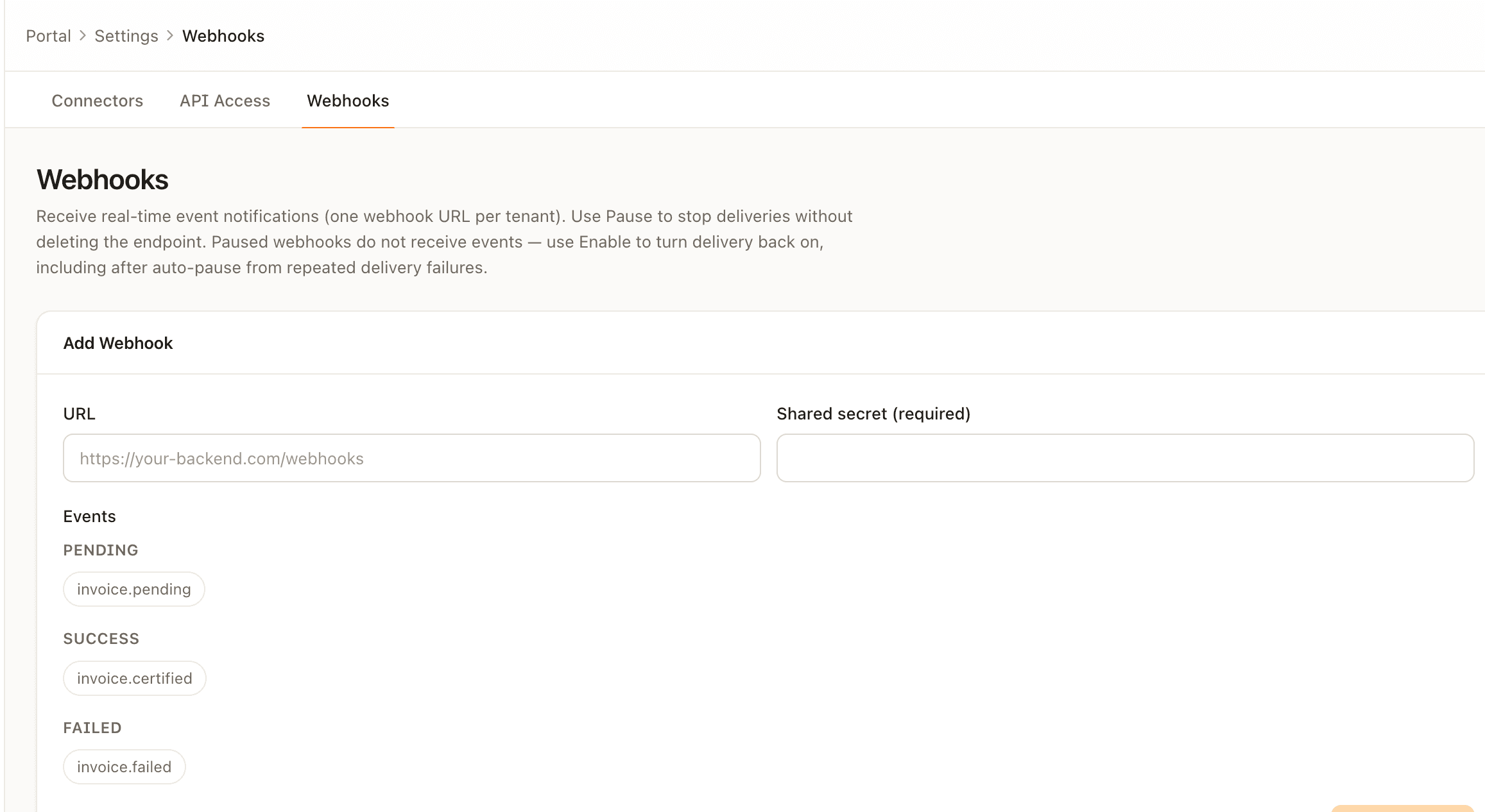
- Delivery method: HTTP POST with Content-Type application/json
- Required shared secret at registration; every delivery includes an HMAC signature in the
x-flowpoint-signatureheader - Root
statusispending,certified, orfailed— matching the event lifecycle - Signed body includes
timestamp(Unix ms) andemittedAt(ISO 8601); reject deliveries older than 5 minutes for replay protection - The
sourcefield identifies which step in the invoice lifecycle emitted the event
Webhook delivery
Flowpoint POSTs each event to your callback URL. Your endpoint must accept the JSON body and return any HTTP 2xx status within 10 seconds. An empty 204 No Content response is fine. Flowpoint does not read or validate your response body on success.
Delivery is at-least-once — the same event may arrive more than once. Use the envelope id field to dedupe on your side.
| Attempt | When | On failure |
|---|---|---|
| 1 | Immediate | Retry after ~5s |
| 2 | After ~5s backoff | Retry after ~10s |
| 3 | After ~10s backoff | Retry after ~20s |
| 4 | After ~20s backoff | Retry after ~40s |
| 5 | After ~40s backoff | Endpoint auto-paused |
A failed attempt is any non-2xx HTTP status, a request timeout (>10s), or a network error. After 5 failed attempts for one delivery, Flowpoint sets the webhook endpoint to inactive and stops sending new events to that URL. Fix your endpoint, then re-enable with PATCH /api/v1/integrations/webhooks/:id and { "active": true } (portal Settings → Webhooks → Edit).
Signature verification
A signing secret is required when you register the webhook. Flowpoint sends x-flowpoint-signature — an HMAC-SHA256 hex digest of the raw request body. Verify the signature with a timing-safe equality check, then reject any delivery where Date.now() - timestamp > 300000 (5 minutes).
const crypto = require('crypto');

const MAX_AGE_MS = 300000; // 5 minutes

function verifyFlowpointWebhook(rawBody, signatureHeader, secret) {
  let event;
  try {
    event = JSON.parse(rawBody);
  } catch {
    return false;
  }

  if (typeof event.timestamp !== 'number') return false;
  if (Date.now() - event.timestamp > MAX_AGE_MS) return false;

  const expected = crypto
    .createHmac('sha256', secret)
    .update(rawBody)
    .digest('hex');
  return crypto.timingSafeEqual(
    Buffer.from(signatureHeader, 'utf8'),
    Buffer.from(expected, 'utf8'),
  );
}
Errors and status meanings
Failed requests return JSON with at least an error string. Many invoice routes also include reason (machine code), detail, and fields. Master-data POST routes use code instead of reason.
If you are having trouble integrating or interpreting API responses, contact support.
{
  "error": "human-readable message",
  "reason": "MACHINE_CODE",
  "code": "machine_code",
  "detail": "optional extra context",
  "fields": { "customer.tin": "required" }
}
Not every field appears on every error. Master-data routes use code instead of reason. Search endpoints return plain error when q is missing or out of range (2–100 characters).
HTTP status codes
| HTTP | When | Meaning | Next step |
|---|---|---|---|
| 401 | Missing or invalid X-Flowpoint-Key header | Request is not authenticated | Send a valid API key in the X-Flowpoint-Key header |
| 403 | Valid API key used on a route that does not accept API keys (e.g. tenant settings) | Route not available to API keys | Use a portal admin session for admin routes, or confirm the endpoint supports API key access |
| 400 | Validation failed, submission blocked, or bad query (e.g. search q too short) | Request cannot be processed — see error and reason/code | Fix the body or query and retry |
| 404 | Invoice, draft, batch, or IRN not found for this tenant | Resource does not exist or is not visible | Check the UUID or IRN |
| 409 | Conflict — duplicate document number, draft not editable, customer/item exists | State conflict — see reason or code | Use a different number or resolve the conflict |
| 429 | Global or per-tenant rate limit exceeded | Too many requests in the window | Backoff and retry; check RateLimit-* headers |
| 503 | GET /health when the API is unavailable | API health degraded — response body { "status": "degraded" } | Retry GET /health; contact support if persistent |
| 500 | Unexpected server error | Internal failure | Retry; contact support if persistent |
| 502 | NRS payment confirm/update failed (PATCH /invoices/{id}/payment) | Upstream NRS call failed — paymentReported stays false | Read nrsError in the body; fix and retry |
Invoice machine codes (reason)
| reason | HTTP | Meaning | Next step |
|---|---|---|---|
| CUSTOMER_VALIDATION_FAILED | 400 | B2B/B2G buyer fields missing or invalid on create or PATCH draft | Send full customer TIN, email, address, city, postal code |
| SUPPLIER_VALIDATION_FAILED | 400 | Tenant supplier profile incomplete on POST /create or submit | Complete NRS supplier fields in the portal |
| DOCUMENT_NUMBER_CONFLICT_INVOICE | 409 | A certified invoice already uses this document number | Pick a different invoice number |
| invalid_document_number | 400 | Document number failed format rules (e.g. UUID-shaped) | Use a human-readable invoice number |
| unresolved_b2b_missing_tin | 400 | B2B invoice could not resolve buyer TIN when saving | Send customer.tin on create |
| unresolved_b2b_customer_address | 400 | B2B buyer address fields could not be resolved | Send full customer address fields |
| unresolvable_hsn | 400 | Line HSN could not be resolved when saving the invoice | Send valid HSN code on each line |
| unresolvable_unit_price | 400 | Line unit price could not be resolved | Send positive Unit price on each line |
| incomplete_unpatchable | 400 | Invoice validation failed and required fixes could not be applied automatically | Fix the payload per error detail |
| ZERO_VALUE | 400 | Invoice total payable is zero | Ensure lines sum to a positive payable amount |
| NO_SERVICE_ID | 400 | Tenant NRS Service ID not configured | Complete NRS Setup in the portal |
| NO_BUSINESS_ID | 400 | Tenant NRS Business ID not configured | Complete NRS Setup in the portal |
| NO_KEYS | 400 | No active cryptographic keys on the tenant | Upload keys in Settings → Crypto Keys |
| BLOCKED_PENDING_REVIEW | 400 | Invoice held for review before NRS submission | Complete review in the portal, then retry |
| BLOCKED_PENDING_APPROVAL | 400 | Invoice awaiting approval before NRS submission | Complete approval in the portal, then retry |
| BLOCKED_CHECKLIST_FAILED | 400 | Invoice did not pass validation before NRS submission | Fix validation errors in the response detail |
| SUBMISSION_ERROR | 500/502 | NRS submission failed unexpectedly | POST /invoices/{id}/retry |
| NOT_SIGNED | 400 | Reconcile called on an invoice not yet certified | Submit to NRS first |
| NOT_ELIGIBLE | 400 | Payment report not allowed for this invoice | Invoice must be certified B2C in reported status with an IRN |
Master data codes (code)
Returned by POST /api/v1/customers and POST /api/v1/items.
| code | HTTP | Meaning | Next step |
|---|---|---|---|
| missing_field | 400 | Required field empty on POST /customers or POST /items | Send all required fields in the body |
| invalid_tin | 400 | Customer TIN too short or invalid format | Send a valid TIN (≥5 characters) |
| invalid_email | 400 | Email missing or invalid format | Send a valid email address |
| invalid_phone | 400 | Phone missing or does not start with + country code | Send phone as +2348012345678 |
| invalid_state | 400 | state is not a known NRS code | Omit state or use GET /helpers/states |
| invalid_lga | 400 | lga invalid, or state missing when lga is sent | Omit lga or pair with a valid state from GET /helpers/lgas |
| invalid_kind | 400 | customerKind is not B2B or B2G | Set customerKind to B2B or B2G |
| tin_exists | 409 | Customer with this TIN already exists | Use GET /customers/search or list |
| invalid_price | 400 | unitPriceKobo missing, zero, or negative | Send an integer kobo amount greater than zero |
| invalid_cost | 400 | costKobo negative when provided | Omit cost or send a non-negative amount |
| invalid_tax_scheme | 400 | Unrecognised taxScheme value | Use STANDARD_VAT or another supported scheme |
| item_exists | 409 | Item with this name already exists | Use GET /items/search or list |
| create_failed | 500 | Record insert succeeded but could not be read back | Retry; contact support if persistent |
Create response status
The status field on POST /invoices/create.
| status | HTTP | Meaning | Next step |
|---|---|---|---|
| PENDING | 202 | Invoice accepted for NRS processing | Poll GET /invoices/{invoiceId} until certified or failed |
| BLOCKED:… | 201 | Invoice saved but not submitted to NRS (review, approval, or validation) | Resolve the block in the portal, then retry |
Payment status fields
From PATCH /invoices/{id}/payment.
| Field | Values | Meaning |
|---|---|---|
| paymentStatus (Flowpoint) | PAID · PARTIAL · UNPAID | Local payment state after successful NRS update |
| nrsPaymentStatus (NRS) | PENDING · PARTIAL · PAID · REJECTED | Status sent to NRS on PATCH /payment |
| nrsError | string | Present on HTTP 502 when NRS confirm or update fails |
Public IRN verify
GET /api/v1/invoices/verify/{irn} — no auth.
| Outcome | HTTP | Meaning | Next step |
|---|---|---|---|
| valid: true | 200 | IRN exists and is certified for a tenant | Use returned invoice summary |
| valid: false, reason: malformed IRN | 400 | IRN string failed format check | Correct the IRN |
| valid: false, reason: IRN not found | 404 | No matching certified invoice | Verify IRN with issuer |
Helpers
Reference lookups for standard codes and labels used on invoices — invoice types, tax categories, payment means, quantity units, product and service codes, and Nigeria states, LGAs, and countries. Authenticate with your API key. Responses may be cached for a short period; stay within rate limits.
Public Endpoints
No authentication required. API health check and public IRN verification.
API health (GET /health)
GET /health is an unauthenticated uptime check. It is not rate-limited. Returns { "status": "ok" } (HTTP 200) when operational, or { "status": "degraded" } (HTTP 503) when unavailable. The status field here means API health — not invoice or batch status.
| body.status | HTTP | Meaning | Next step |
|---|---|---|---|
| ok | 200 | API is operational | None |
| degraded | 503 | API health check failed | Retry GET /health; contact support if persistent |
If you are having trouble integrating or interpreting API responses, contact support.